By Alexander Merz · Published on
Astrophotography software combines many individual exposures into one low-noise image (stacking) and then brings out the faint nebulae and colours. There are very good free programs for both, above all Siril, which runs on Windows, Mac and Linux.
The bigger picture is in our overview: astrophotography.
⭐ In short: Siril is the best start for most people: free, on every system, stacking and processing in one. For the Milky Way with a landscape, use Sequator (Windows) or Starry Landscape Stacker (Mac); for planets, AutoStakkert!.
What stacking does
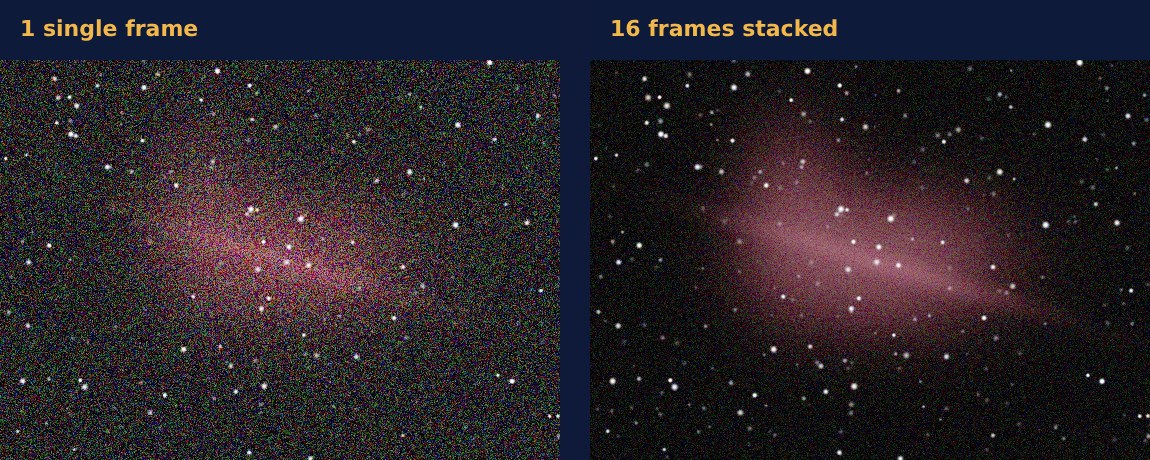
Every exposure contains the same signal, but randomly distributed noise. If you lay many exposures on top of each other and average them, the signal stays and the noise partly cancels out.
The rule of thumb: four times as many exposures halve the noise. So 16 frames give you an image with a quarter of the noise. That is why astrophotographers often expose a single object for hours.
| Number of exposures | Noise in comparison | Total time at 60 s |
|---|---|---|
| 1 | 100 % | 1 min |
| 4 | 50 % | 4 min |
| 16 | 25 % | 16 min |
| 64 | 12.5 % | just over 1 hour |
Free astrophotography software at a glance
| Program | System | What for | Price |
|---|---|---|---|
| Siril | Windows, Mac, Linux | ⭐ Our recommendationDeep-sky stacking and processing, all in one | free |
| DeepSkyStacker | Windows | Deep-sky stacking, very beginner-friendly | free |
| Sequator | Windows | Milky Way with foreground | free |
| AutoStakkert! | Windows | Planets and the Moon from videos | free |
| RegiStax | Windows | Sharpening planetary images | free |
| GraXpert | Windows, Mac, Linux | Smoothing the sky background, denoising | free |
| GIMP | Windows, Mac, Linux | Finishing touches, layers, masks | free |
Tip: Start with one program and stick with it until you understand it. If you jump between five tools, you will not learn any of them properly.
Astrophotography software for Mac
Many well-known stacking programs only run on Windows. On the Mac, these are the alternatives.
| Program | What for | Price |
|---|---|---|
| Siril | Deep-sky stacking and processing | free |
| Starry Landscape Stacker | Milky Way with landscape (the Mac counterpart to Sequator) | paid |
| GraXpert | Removing gradients | free |
| Astro Pixel Processor | Stacking, mosaics, calibration | paid |
| PixInsight | Professional processing | paid |
DeepSkyStacker, Sequator and AutoStakkert! are not available natively for macOS. With Siril you still cover deep sky completely on the Mac.
How processing works
- Capture: Many individual frames in RAW format, plus calibration frames.
- Stack: The program aligns the stars and averages the frames.
- Smooth the background: Remove light pollution and vignetting.
- Calibrate colour: Stars get their natural colour.
- Stretch: Brighten the dark areas without blowing out the stars.
- Finishing touches: Contrast, saturation and noise in GIMP or Photoshop.
Calibration frames improve the result noticeably. Darks remove thermal noise and hot pixels, flats remove dust spots and dark corners. How to take them is explained under dark frames.
Common mistake: stacking JPGs. The camera has already smoothed away noise and bent the colours in them, so stacking lacks the raw material. Always shoot RAW.
Stacking the Milky Way with a landscape
In landscape shots the sky moves, the foreground does not. Normal stacking programs therefore smear the ground. Sequator and Starry Landscape Stacker separate sky and foreground and stack only the stars.
With 10 to 20 exposures from a tripod, the Milky Way becomes clearly less noisy. Shoot them in RAW, with the lens wide open and a high ISO.
Stacking planets and the Moon
Planets are not exposed, they are filmed. From thousands of video frames, AutoStakkert! picks the sharpest ones, taken in moments when the air was steady.
RegiStax then sharpens the result with so-called wavelets. Our guide to planetary photography explains the whole technique.
Paid programs: when are they worth it?
PixInsight and Astro Pixel Processor are more powerful, but also harder to learn. They are worth it if you image deep sky regularly and hit the limits of Siril.
You will not need them for the first year or two. Many impressive images in astronomy forums were made entirely with free software.
Software for capturing
Besides processing, there is software that controls the capture. It drives the mount, shoots exposure series and keeps the focus.
| Solution | System | Price |
|---|---|---|
| N.I.N.A. | Windows | free |
| KStars / Ekos | Windows, Mac, Linux | free |
| ZWO ASIAIR Plus (256GB)ZWO ASIAIR Plus 256GB | dedicated device, controlled by app | $399.00€ 499 |
Links marked with an asterisk are affiliate links.
Smart telescopes take all of this off your hands: they stack directly in the device, and you watch the image grow live. You will find a comparison under smart telescope.
FAQ: astrophotography software
What software can I use to stack astrophotos?
For deep sky, Siril or DeepSkyStacker; for the Milky Way with a landscape, Sequator or Starry Landscape Stacker; for planets, AutoStakkert!. All except Starry Landscape Stacker are free.
Is there free astrophotography software for Mac?
Yes, Siril runs natively on the Mac and can stack and process. Add GraXpert for the background and GIMP for the finishing touches.
How many frames should I stack?
As many as possible. Even 10 to 20 exposures make a visible difference; for faint nebulae, several hours of total exposure are normal.
Can I stack astrophotos in Lightroom or Photoshop?
Photoshop can average layers, Lightroom cannot. For astrophotos, specialised programs are better, because they align stars automatically and process calibration frames.
* Affiliate link: if you buy through this link we may earn a small commission from Astroshop, High Point Scientific or another linked retailer, at no extra cost to you.