By Alexander Merz · Updated on · Details checked on 20 September 2026
With a star chart, you can identify the stars and constellations in the sky. Whether you use an online star chart, a star chart app or a rotating star chart for this is entirely up to your taste.
⚡ The quick answer: A star chart shows you which stars, constellations and planets are in your sky right now. Three paths lead to the goal: online star charts on your PC, apps on your smartphone – or the timeless classic, the rotating planisphere (inexpensive, no batteries needed), which works without a battery and without the light pollution caused by display brightness.
All star charts show the currently visible stars, planets and constellations in the firmament. This article explains the advantages and disadvantages of the various models.
Using a star chart online
You can easily find a star chart online. Various websites offer a range of star charts. Some show you the current starry sky, updated hourly. Others give you the option of entering data.
After you have entered the data, the star chart is displayed in your browser. In most cases, you enter the date, the time and the time zone in the fields provided.
You then get an overview of the starry sky as it is for that data. In some cases the images are divided into the northern, eastern, western and southern sky. This makes stars and constellations easier to recognise. Sometimes the sky appears as a single overview.
Online, you can usually enlarge the star chart with a click of the mouse. Occasionally there are also virtually rotatable star charts.
Star chart: typical display
The brightest stars and the planets are labelled with names. They are shown as larger dots than dimmer stars. Constellations are shown by thin lines and given names.
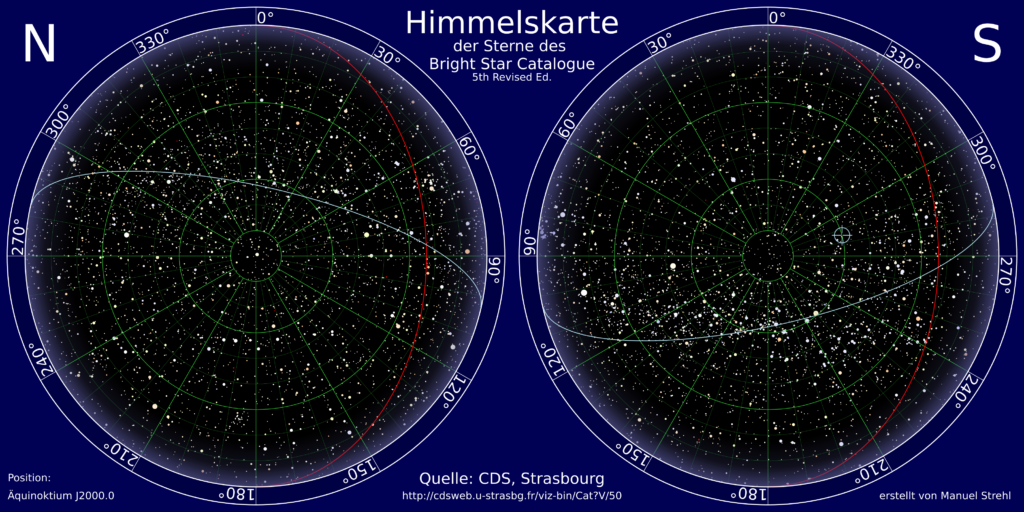
Using a star chart online makes sense when you want to get an overview of the starry sky. If you can see stars from your window and want to know which ones they are, the online star chart is handy.
What is visible when?
The night sky changes from month to month. These guides give you an overview of what is worth looking for:
- Astronomy highlights of the northern hemisphere – the best sights season by season
- Astronomical events – eclipses, conjunctions and other dates worth planning for
- Meteor shower calendar – every major shower with its peak night
- Planets visible tonight – which planets are up right now
- Moon calendar – moon phases for the whole year
Online star chart: some drawbacks
If you want to observe stars out in the open, an online star chart is not an advantage, as there is usually no computer to hand outdoors. A smartphone display is too small for showing star charts. That is because the starry sky is displayed online on a small scale.
In addition, the eyes’ dark adaptation is disturbed.
An app for identifying the stars
There are various astronomy apps for iPhone and Android phones. You can conveniently download and install an app onto your smartphone.
There are free and paid apps. The free apps are particularly suitable for beginners. They deliver solid results when exploring the starry sky. The advertising displayed is often a little annoying.
Star chart app: comprehensive information
Besides the names of stars, planets and constellations, the apps also show galaxies and well-known satellites. In addition, there are sometimes extensive extra features. From beautiful images of the zodiac signs, to the tracking of celestial bodies in the firmament, to further data on the objects.
The range of functions differs across all apps. It is worth comparing the apps and finding out what matters to you.
Through in-app purchases, you can expand the range of functions of apps. If you want to know which nebulae, asteroids, comets and satellites are passing over you, a purchase is worthwhile.
Differences between the apps
There are apps with which you point your smartphone at an object and find out what you are looking at. On the other hand, you can use apps that provide information about the starry sky, similar to a planetarium.
First, let us look at the apps with which you can identify a specific object in the sky by pointing your smartphone at the object. For the apps to work, your smartphone must have GPS, a compass and an accelerometer. When you use the app, hold the camera up to the starry sky.
This allows the app to recognise your position and the direction in which you are holding the device. If your smartphone does not meet these requirements, the apps only give a general overview of the current starry sky, without revealing precise information about your target.
The advantage of such apps lies in being able to point the camera at a star, planet or constellation and then find out what it is. Most apps work both by day and by night.
Besides the name, the apps sometimes also show additional information such as the size, distance, rise and set time of the object, brightness and more.
Anyone who has no experience of orienting themselves in the starry sky and still wants to know what they are seeing is well served by these apps.
Other apps provide extensive knowledge, realistic depictions of the starry sky and fantastic images of celestial objects. This makes these apps similar to interactive encyclopaedias that make exploring the starry sky a pleasure. Here too, the scope of the individual apps varies greatly.
A star chart app quickly provides an answer to the question of what can currently be seen in the sky. The apps work quite accurately and provide further interesting information.
Star chart app: our selection
Stellarium is probably the best-known app in Germany. It offers a comprehensive range and useful functions for discovering the night sky.
SkyView lite offers a great experience through the use of augmented reality.
The chart marks star clusters and nebulae too – with the naked eye you will see almost none of them.
Constellations, the Moon and the bright planets need no equipment at all. Six short questions, an honest answer by email – no sales pressure.
The rotating planisphere – a timeless classic
⭐ Our recommendation: the rotating planisphere
Orion Star Target Planisphere (40°–60°N)Orion Star Target PlanisphereOculum Swivelling Sky Map 29 cm ($7.95€ 19.90) – set the date and time, hold it up, read off the constellations. No battery, no bright display that ruins your eyes’ dark adaptation – which is why even experienced observers swear by the classic.
Check availability* →Check availability* →
Chart in hand, but still no bearings? Start with the Big Dipper – from it you can find all the important constellations.
You may still remember the rotating star chart from astronomy lessons at school. It consists of two plastic discs that are fixed on top of each other and can be rotated.
The chart depicts the night sky with its most important stars, planets, star clusters, nebulae and constellations. The brighter a star, the larger its dot on the star chart, and its name is recorded. Constellations are joined by lines and labelled.
With this chart, you can determine the visible sky by date, time or coordinates. On it you will find the date line, the setting scale of the true sun, the right ascension scale and the indication of the ecliptic longitude.
This may at first sound scientific and complex, but it is useful when you want to know and set the coordinates of a celestial body, or want to determine them.
It is easier to find out which constellation or which star you are currently seeing. To do this, you turn the upper, transparent disc so that the current date and time match. The bright area of the chart now shows the current sky.
Using the cardinal directions on the chart, you can orient yourself. If you turn to the south, for example, you will see the constellation of Orion. Look to the north, and you will see the Great Bear.
Rotating star charts are aligned to a specific latitude band, so for the US you’ll want one matched to the mid-northern latitudes (around 40°N covers most of the country). They usually contain local time corrections, which is why the sky over Boston shows a slightly different picture at the same time than the sky over Chicago. This way you can also determine the correct sunrise and sunset.
There are various versions of the chart. Some are optimised for red light, so that at night you can switch between the sky and the chart without your eyes constantly having to adapt to brightness and darkness. Other charts are fluorescent and glow in the dark, while yet others require a torch.
Exploring the sky is a basic human need. Every type of star chart fulfils this need while offering different aspects of entertainment.
Operating a star chart: a child’s-play guide
A rotating star chart is a great tool for exploring the night sky and finding the stars and constellations more easily. Follow these simple steps to use your star chart.
Steps:
- Set the date and time:
- Find the circles on the chart that show the month and the day.
- Turn the chart until your current date lines up with the edge of the outer circle.
- Make sure the time on the chart matches the current time.
- Find the direction:
- Stand facing north. You can do this with a compass app on a smartphone or a real compass.
- Hold the star chart so that the word “North” on the chart points in the same direction as you.
- Hold the star chart up to the sky:
- Raise the chart above your head and look up.
- The chart shows you which stars and constellations are currently visible in the sky.
- Compare the chart with what you see in the sky to find the constellations.
- Look for constellations:
- The constellations are marked on the chart by lines and names.
- Look for conspicuous stars or patterns in the sky that you can recognise on the chart.
- The more stars and constellations you find, the better you will become at recognising the night sky.
Tips:
- It is best to use the star chart when it is dark and the sky is clear.
- Try to look at the sky from a place with little artificial light, such as a garden or park.
- Give your eyes time to get used to the darkness before you use the star chart.
- Use a torch with red light to read the chart in the dark without disturbing your night vision.
Have fun discovering the night sky with your rotating star chart!